Malware Detection in Portable Executable (PE) Files Using Machine Learning
This project implements a machine learning-based approach to detect malware in Portable Executable (PE) files. By analyzing features extracted from PE file headers and sections, the tool distinguishes between malicious and benign executables using various machine learning algorithms. The research was published in the IEEE Xplore journal under the title “Malware Detection in PE Files Using Machine Learning” (DOI: 10.1109/OTCON52089.2022.10113998).
Overview
Malware poses a significant threat to digital systems, and detecting it in executable files is critical for cybersecurity. This project leverages the structure of PE files, commonly used in Windows executables, to extract features such as header information, section entropy, and other metadata. These features are used to train machine learning models to classify files as either malicious or benign.
The tool supports:
- Feature Extraction: Extracts 54 features from PE files, with 13 identified as most significant for classification.
- Model Training: Utilizes algorithms like Random Forest, Decision Trees, Gradient Boosting, AdaBoost, and Bayes Theorem.
- Prediction: Tests unknown PE files to determine if they are malicious or legitimate.
Background
What is a Portable Executable (PE) File? 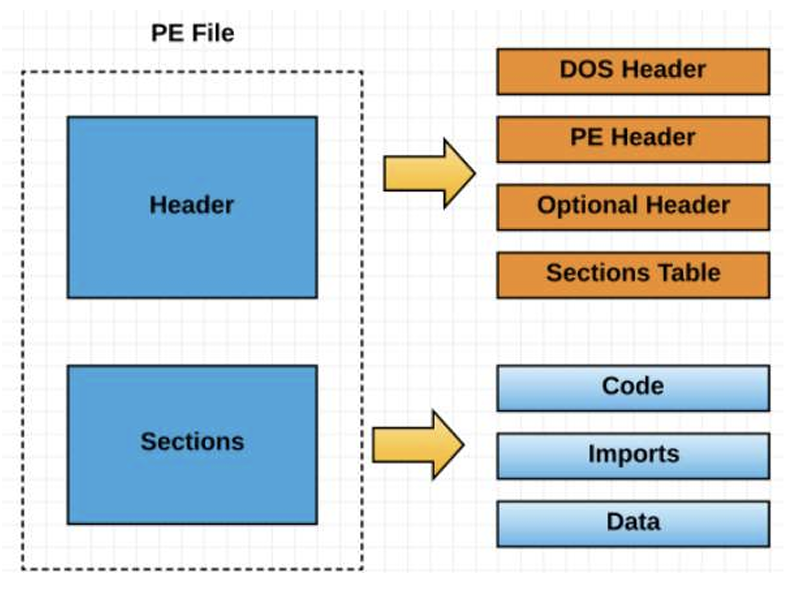
A Portable Executable (PE) file is a file format used by Windows operating systems for executable files, such as programs (.exe), dynamic link libraries (.dll), and other types of system files. Think of a PE file as a structured container that holds everything needed to run a program: the code, data, and instructions for the operating system on how to load and execute it.
A PE file is organized into several parts:
- DOS Header: A small piece at the start that ensures compatibility with older MS-DOS systems. It includes a “magic number” (MZ) to identify it as an executable.
- PE Header: Contains key details like the type of program, required memory, and where the code starts.
- Sections: These store the actual content, such as:
- .text: The program’s code (instructions the computer runs).
- .data: Data the program uses, like variables.
- .rdata: Read-only data, such as import/export tables.
- .rsrc: Resources like icons or strings for multiple languages.
- Section Table: A map that describes each section’s size, location, and purpose.
PE files are widely used in Windows, making them a common target for malware because they can hide malicious code within their complex structure.
What is Malware?
Malware, short for “malicious software,” is any program designed to harm or exploit a computer system, network, or user. Malware can steal data, disrupt operations, or give attackers unauthorized access. It often disguises itself as legitimate software to trick users into installing it.
Common types of malware include:
- Viruses: Programs that attach to other software and spread by modifying files.
- Worms: Self-replicating programs that spread across networks, consuming resources or stealing data.
- Trojans: Malware that pretends to be a harmless program but performs harmful actions, like creating backdoors for hackers.
- Spyware: Software that secretly monitors user activity and collects sensitive information.
- Ransomware: Malware that encrypts a user’s files and demands payment to unlock them.
- Adware: Programs that display unwanted ads, often slowing down systems.
Malware can hide in PE files by exploiting redundant fields or manipulating sections, making detection challenging.
Why Machine Learning for Malware Detection? 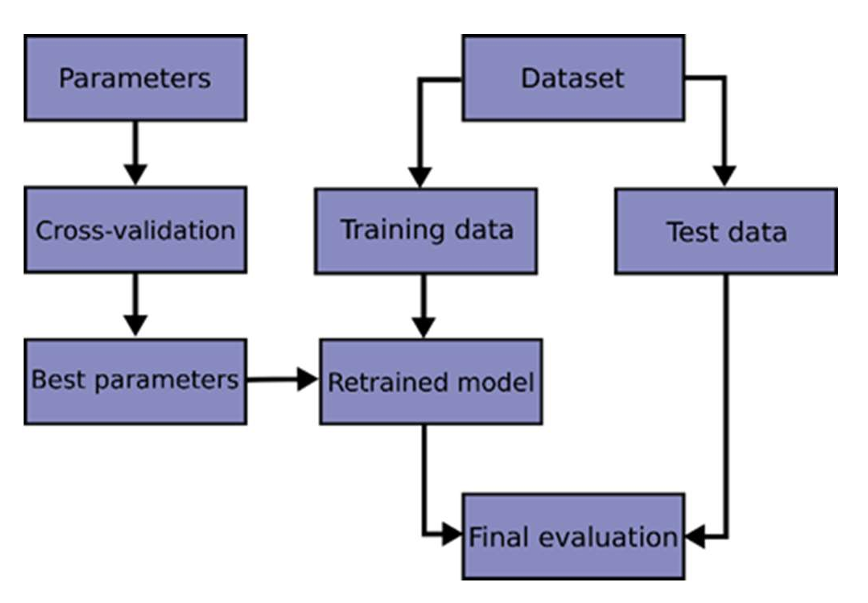
Traditional malware detection relies on signatures (unique patterns in known malware), but modern malware often changes its code to evade detection. Machine learning offers a smarter approach by analyzing patterns in PE file features (like header data or section entropy) to identify suspicious files without needing exact matches. This project uses machine learning to “learn” what makes a file malicious or benign based on a dataset of examples.
Key Concepts
- Feature Extraction: The process of pulling out specific pieces of data from PE files (e.g., size of headers, entropy of sections) to analyze for signs of malware.
- Entropy: A measure of randomness in a file’s data. High entropy in certain sections might indicate packed or obfuscated malicious code.
- Supervised Learning: A machine learning method where models are trained on labeled data (e.g., “malicious” or “benign”) to predict labels for new files.
- False Positives/Negatives: False positives occur when a benign file is wrongly flagged as malicious, while false negatives miss actual malware. Both are critical metrics for evaluating model performance.
This project focuses on static analysis, meaning it examines the file’s structure without running it, which is safer but may miss behaviors only visible during execution.
Requirements
- Python 3.x
- Required Python libraries:
pandasnumpyscikit-learnpefilejoblib
Installation
- Clone the repository:
1 2
git clone https://github.com/achintya-esbee/PEMalDetection.git cd PEMalDetection - Install the required dependencies:
1
pip install pandas numpy scikit-learn pefile joblib
Usage
Training the Model
To train the machine learning models on the dataset, run the learning.py script. The script processes a dataset of PE files, extracts features, and trains multiple classifiers.
Example:
1
python learning.py
This script:
- Imports a dataset (e.g., from Kaggle, containing 137,444 files: 40,918 malware and 96,526 benign).
- Extracts 54 features, shortlists 13 critical ones (e.g., DllCharacteristics, SectionsMaxEntropy, etc.).
- Trains models (Random Forest, Decision Trees, etc.) and saves them for future predictions.
Testing a PE File
To analyze a specific PE file for malware, run the checker.py script with the path to the test file.
Example:
1
python checker.py -i test.exe
-i: Path to the PE file to analyze.
The script will output whether the file is classified as malicious or benign.
Example
- Train the Models:
1
python learning.py
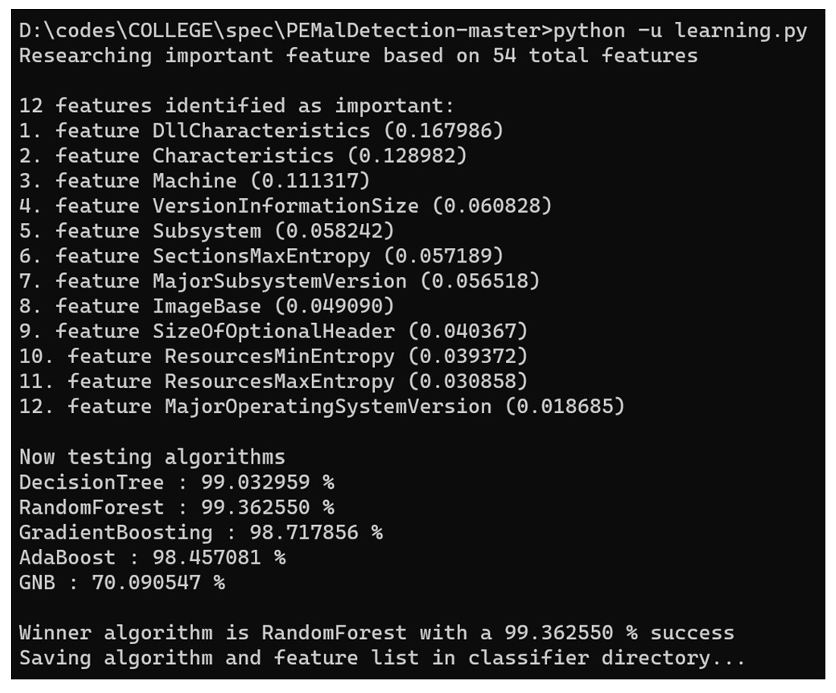
This trains the classifiers on the dataset and saves the trained models.
- Test a File:
1
python checker.py -i sample.exe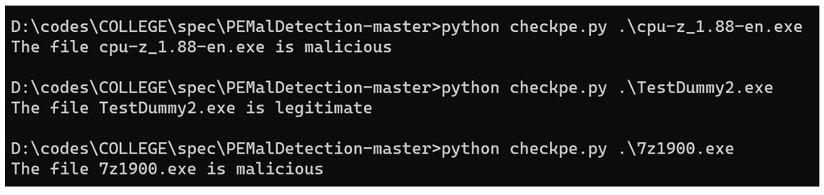
Output:
The file sample.exe is [malicious/benign].
Dataset
The dataset used contains 137,444 PE files (EXE, DLL, etc.), with 40,918 malware files and 96,526 benign files. It was sourced from Kaggle and VirusShare. Key features extracted include:
- DllCharacteristics
- Characteristics
- Machine
- VersionInformationSize
- Subsystem
- ImageBase
- SizeOfOptionalHeader
- MajorSubsystemVersion
- SectionsMaxEntropy
- ResourcesMaxEntropy
- ResourcesMinEntropy
- MajorOperatingSystemVersion
- SectionsMinEntropy
Methodology
- Data Collection: Download PE files from Kaggle and VirusShare.
- Feature Extraction: Extract 54 features from PE file headers and sections using the
pefilelibrary. - Normalization: Normalize features to ensure consistent scale.
- Feature Selection: Reduce to 13 critical features using feature importance analysis.
- Model Training: Split data into training and test sets, then train classifiers (Random Forest, Decision Trees, etc.).
- Model Validation: Evaluate models using metrics like false positive and false negative rates.
- Prediction: Use trained models to classify new PE files.
Notes
- The tool focuses on static analysis of PE files, extracting features without executing the files.
- Supported file types include EXE, DLL, and other PE formats.
- The 13 selected features were chosen based on their significance in distinguishing malware from benign files.
- Models are saved using
joblibfor efficient reuse in predictions.
Limitations
- The tool relies on static analysis, which may miss obfuscated or packed malware.
- The dataset must be representative to avoid bias in model training.
- Feature extraction assumes well-formed PE files; corrupted files may cause errors.
- The tool does not perform dynamic analysis or detect runtime behaviors.
Citation
If you use this work in your research, please cite the paper:
S. Tyagi, A. Baghela, K. M. Dar, A. Patel, S. Kothari and S. Bhosale, “Malware Detection in PE files using Machine Learning,” 2022 OPJU International Technology Conference on Emerging Technologies for Sustainable Development (OTCON), Raigarh, Chhattisgarh, India, 2023, pp. 1-6, doi: 10.1109/OTCON56053.2023.10113998. keywords: {Machine learning algorithms;Supervised learning;Static analysis;Malware;Libraries;Classification algorithms;Decision trees;Malware Detection;Static malware analysis;Opcode N-grams;Byte N-grams;PE Header;PE file;Machine Learning},
Acknowledgments
This work was conducted at the Symbiosis Institute of Technology, Symbiosis International (Deemed University), Pune, India, under the guidance of Dr. Sonali Kothari and Dr. Snehal Bhosale.
This research was conducted as part of my final year specialisation project at Symbiosis Institute of Technology (Feb, 2023). The full research paper and implementation details are available for academic and educational purposes.